
Blog

Recent posts
SEARCH RESULTS FOR: Photojunction Retro
We are about to release a new version of Photojunction that will no longer support Macintosh pre-Intel PowerPCs, which were discontinued in 2006. This is necessary so that we can upgrade the Photojunction development environment, which no longer supports PowerPCs. If you are running a Windows PC you won't be affected. If you're running an Intel-based Mac you won't be affected either. All Macs have been Intel-based since 2007, so if your computer is newer than that you're fine. If you're not sure you can check by going to About This Mac under the Apple menu. We have announced that this is coming To View More >>
This entry was posted in by Admin
Warning: Your high-res files are missing! At one stage or another in your relationship with Photojunction I'm sure you've encountered this warning. If it was a popularity contest it would end up below car salesmen, cold callers and politicians. But love it (nobody) or hate it (everybody) it's there for a good reason. Photojunction travels along paths. It follows those paths to locate, use and update the proxy images, hi res files and exports created as you work. The rules are simple. If you don't move, rename or delete your files and folders, Photojunction will find them. But life isn't simple, To View More >>
This entry was posted in by Admin

I was talking to Simon, one of our album layout designers, about how the team were finding the new Workspace album proofing feature. They've been using it with photographers for a few months now and I was keen to get his feedback. What follows is pretty much his response verbatim. "It's working brilliantly! We get to review the studio’s comments alongside the relevant layouts. It’s accurate and clear to follow. "Not having to interpret requests for edits in emails is a real bonus. The integrated communication between the studio, bride and groom, and designer keeps everybody in the loop, and To View More >>
This entry was posted in by Admin
If you reopen an album in Photojunction after sending to Queensberry, you'll notice it's "locked" and cannot be modified. Why? Because if you were to make changes to the album after we've received the order, we'd be making something different, which would certainly cause us confusion – you, us, or all of us – as you can imagine. So if you need to make changes to the album, eg upload new files, or order an extra copy, you'll need to duplicate the album first. Cheers, Angelique To View More >>
This entry was posted in by Admin
Let's face it, if you don't import images into Workspace then not a lot is going to happen. Unless you're just using it to proof the albums you've designed in Photojunction, that is. So let's start at the Dashboard, and click New Event. The first thing Workspace will ask for is an Event name. This could be your clients' names. Click Create Event. Once you have done that, click Add Images To Event, and browse for your files. The maximum size for a file is 28MB, and it needs to be a JPEG or TIFF. But choose a size that's suitable for what you want to use it for – no bigger, or you'll be using To View More >>
This entry was posted in by Admin
Here's my second handy hint about file management. Don't muck about with your hi res files outside Photojunction after they've been imported. The key words there are outside Photojunction. If you want to keep the software smiling, they're important. It means you need to think about when and how you copy image files, and when you are going to do your artwork. Here are three alternative scenarios, which all keep PJ happy if used properly: 1. Do art work on your images before importing them. This is so you can import one set of finished files without lots of extra images, sub-folders etc to confuse To View More >>
This entry was posted in by Admin
Hi Guys, I have been having a few "GoToMeeting" video calls with clients recently and if I was going to comment about anything it would be how we manage files. There is a wide variety of ways people set up and work with their files, and sometimes they lead to confusion and frustration. Here's the first of a couple of posts that will help. ;) Place your files somewhere safe. Your desktop may not be the best place to save files, because you may have a tidy up and delete something that you may want to retain, at least until you get your album back. On the flip side you don't want to bury them deep To View More >>
This entry was posted in by Admin
By default Photojunction keeps its main database and your template and project files in a folder called "Photojunction" on your computer. You can move the folder to a new location, but by default you'll find it here: Windows Vista and Windows 7: C:Program DataPhotojunction Windows XP: C:Document and SettingsAll UsersApplication DataPhotojunction Mac: Macintosh HD:Users:Shared:Photojunction: If you're shifting to a new computer, just move the ENTIRE FOLDER to the equivalent location on the new machine. Some people may have moved their PJ Project files (client/event/album data) to a different location. To View More >>
This entry was posted in by Admin

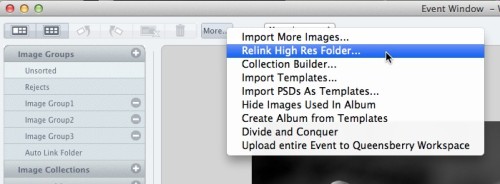
I'm a bit obsessed with clearing my problem reporter. When I do, I know I did my best to make the album perfect production-wise. When we did the Problem Reporter Webinar, Ian had a list of the different errors that could come up. I like to think of it as a cheat sheet for questions Photojunction users might have for me. The most common one I hear is missing HR files. If you are receiving this message, it means that Photojunction doesn't know where your High Res images are. They may have been moved or the path could have been renamed. In the Event Window, click the More button, select "Relink High To View More >>
This entry was posted in by Admin
From v1.46 onwards, Photojunction will automatically install Queensberry's colour profiles for both our silver halide Lab and our digital-offset press books. To use them you just need to add them to your soft-proofing set-up (in Photoshop, it's at View / Proof Setup – and if you're unclear about it, the process is described in our knowledge base): However, this new system wasn't available before Photojunction version 1.46. That means, if you've designed and exported a Press Book using v1.45 recently, but not sent it yet, we suggest you re-export the album using v1.46 before hitting the send button. To View More >>
This entry was posted in by Admin


